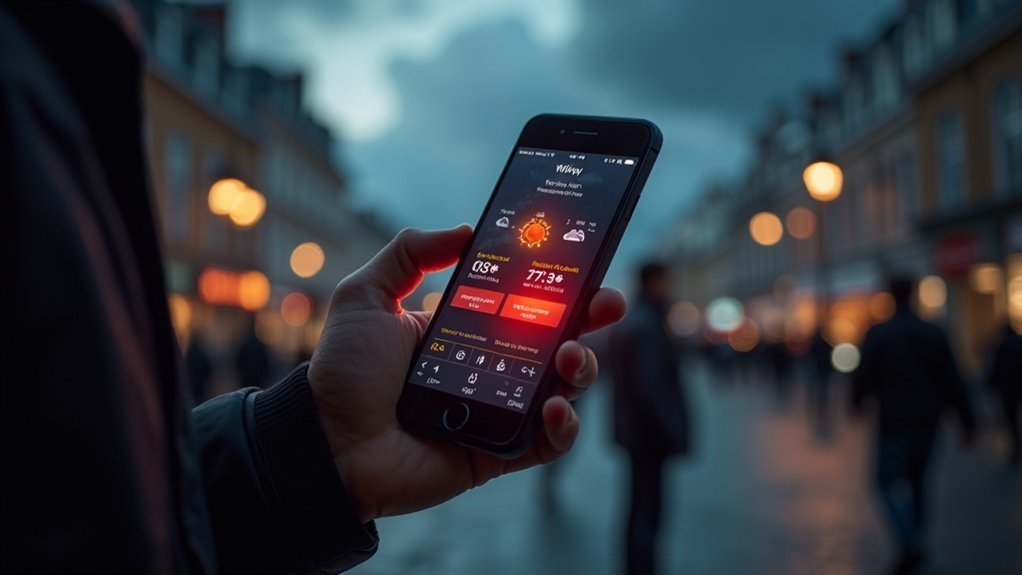
To stay informed about local emergency alerts, you can utilize AlertHouston, which provides critical updates customized to your specific location. By registering for notifications through email, text, or voice calls, you can effectively manage alerts for up to five different addresses, ensuring you’re always in the loop. Additionally, most mobile phones are automatically enrolled in Wireless Emergency Alerts (WEA), delivering urgent information directly to you. Engaging with local community preparedness programs and following relevant social media channels can further enhance your readiness for emergencies. Staying informed is a key aspect of survivalism, and there are many resources available to help you remain vigilant and prepared.
Key Takeaways
- Register for AlertHouston to receive geo-targeted emergency alerts via email, text, voice calls, or the mobile app based on your location. This is crucial for staying informed about local disasters and emergencies that could impact your survival plans.
- Follow local emergency management agencies on social media for real-time updates and alerts during emergencies. Staying connected to these channels can provide you with vital information to enhance your preparedness efforts.
- Participate in community meetings to stay informed about emergency protocols and local preparedness initiatives. Engaging with your community can help you build a network of like-minded individuals who prioritize survivalism and self-sufficiency.
- Utilize Wireless Emergency Alerts (WEA) on mobile devices for quick notifications about emergencies requiring immediate action. This feature can be a lifesaver during critical situations, ensuring you act promptly to protect yourself and your loved ones.
- Access resources on Harris County’s website for templates and guides on family emergency plans and disaster preparedness. These resources are essential for developing a comprehensive survival strategy tailored to your specific needs and circumstances.
AlertHouston Overview
AlertHouston is a vital resource for survivalists and preppers, ensuring you remain informed during emergencies. This service provides critical information directly to residents, delivering timely updates on current conditions and anticipated impacts.
With geo-targeted emergency alerts, you receive pertinent details tailored to your specific location, empowering you to make well-informed decisions. AlertHouston facilitates protective actions through various communication methods, including email, text, voice calls, and a mobile app.
You can register for notifications for up to five physical addresses per contact record, enabling you to customize alerts to suit your preparedness strategy. Stay vigilant and ready by utilizing AlertHouston’s resources during emergencies to safeguard yourself and your loved ones.
Registration Process for Emergency Alerts
To enhance your preparedness during emergencies, it’s crucial to register for emergency alerts through AlertHouston. You can sign up via email, text message, voice call, or the Everbridge app, which is available on both iOS and Android.
The registration process enables you to receive alerts for up to five different physical addresses, keeping you informed about multiple locations relevant to your survival plans. Alerts are geo-targeted, ensuring that you receive pertinent information based on your current location.
Additionally, you have the option to customize your account preferences to select the types of notifications you want to receive, allowing you to stay focused on what matters most. Don’t forget to update your account regularly to ensure you have timely and accurate communication during emergencies, enhancing your overall readiness.
Unsubscribing From Alerts
If you wish to unsubscribe from AlertHouston notifications, the process is straightforward.
Simply click the unsubscribe link found in your emails, or text keywords such as STOP or CANCEL to discontinue SMS messages.
For complete removal from the notification list, send an email to alerthouston@houstontx.gov, ensuring you follow the necessary steps to eliminate unwanted alerts effectively.
Unsubscribe via Email Link
Unsubscribing from AlertHouston emails is a straightforward process, especially if you’re focused on survivalism and prepping.
To stop receiving notifications that don’t align with your preparedness goals, simply click the unsubscribe link in any email you’ve received. This action will help you opt-out of alerts you no longer wish to receive.
If you prefer to unsubscribe from all emails, you can send a request to alerthouston@houstontx.gov. Remember to follow the unsubscribe process carefully to ensure you’re successfully removed from the list.
Additionally, regularly updating your preferences allows you to tailor notifications according to your survival needs, ensuring you only receive the alerts that matter most for your preparedness strategy.
SMS Opt-Out Keywords
Opting out of SMS alerts from AlertHouston is straightforward and efficient.
To unsubscribe from text notifications, simply respond with recognized keywords like STOP, END, UNSUBSCRIBE, QUIT, or CANCEL. Each of these keywords takes effect immediately, ensuring you won’t receive any more SMS alerts.
Understanding this process is crucial for managing your communication preferences effectively, especially in a survival situation where timely information is key.
If you wish to unsubscribe from all alerts at once, you can also send an email to alerthouston@houstontx.gov.
Stay informed and in control of your communication preferences with these simple steps, ensuring you’re prepared for any scenario.
Complete Unsubscribe Process
Managing your communication preferences is crucial when it comes to unsubscribing from AlertHouston alerts. If you wish to stop receiving notifications, simply click the unsubscribe link found in the AlertHouston emails or respond to SMS messages with recognized keywords such as STOP or CANCEL. For those who want to fully opt-out of all alerts, send an email to alerthouston@houstontx.gov. Ensure you follow the process carefully to confirm you’re completely unsubscribed; however, keep in mind that this means you’ll no longer receive vital emergency information.
| Method | Action | Keywords/Details |
|---|---|---|
| Click unsubscribe link | Found in AlertHouston emails | |
| SMS | Reply with keywords | STOP, END, UNSUBSCRIBE, QUIT, CANCEL |
| Complete opt-out | Send an email request | alerthouston@houstontx.gov |
In the world of survivalism and prepping, staying informed is essential. Unsubscribing may leave you without important updates that could aid in your preparedness efforts.
Wireless Emergency Alerts (WEA)
When emergencies arise, Wireless Emergency Alerts (WEA) are a crucial tool for survivalists and preppers, as they quickly inform you about situations that demand immediate action, such as severe weather warnings or missing persons.
In Houston, most mobile phones are automatically opted in to receive these alerts, ensuring that vital information reaches residents promptly. WEA notifications are concise, delivering essential details about the emergency and recommended actions to take for safety.
These alerts come from Federal, State, and local authorities, enhancing the reliability of emergency communications that every prepper should be aware of. If you’ve opted out before, it’s important to opt back in to stay informed and prepared during critical situations.
Emergency Information Center
The Emergency Information Center serves as a vital resource for preparedness enthusiasts and survivalists in Houston, offering real-time updates and alerts during crises.
Here’s how you can enhance your readiness:
- Sign up for AlertHouston to receive critical notifications directly to your device, ensuring you’re always informed.
- Access timely updates on current conditions and safety measures to make informed decisions for you and your family.
- Follow the City of Houston Office for accurate information and guidance to bolster your emergency plans.
- Stay connected with local emergency management for the latest alerts, strategies, and resources to enhance your survival skills.
Community Engagement and Preparedness
Getting involved in your community is crucial for enhancing survival skills and preparedness.
By participating in local survival programs and registering for alerts, you can access vital resources and stay informed during crises.
Together, we can cultivate a more self-reliant community that’s equipped to respond effectively to any emergency.
Community Involvement Opportunities
Engaging in community involvement opportunities is crucial for enhancing local emergency preparedness and resilience. Here are four ways you can contribute to community engagement and public safety:
- Join the Community Emergency Response Team (CERT) to receive invaluable disaster preparedness training and support your neighbors during crises, ensuring that your community is equipped to handle emergencies effectively.
- Follow local emergency management on social media for real-time emergency alerts and updates, keeping you informed and ready to act when necessary.
- Attend community meetings to understand emergency protocols and share your knowledge, helping to build a more informed and prepared populace.
- Volunteer for local initiatives that promote preparedness efforts, fostering a collaborative approach to risk assessment and response among your community members.
Your active participation is vital in creating a safer, more self-sufficient community.
Emergency Preparedness Resources
Preparing for emergencies is crucial for survivalists and preppers, and numerous resources are available to help you and your community strengthen your resilience and readiness.
The Community Emergency Response Team (CERT) Program offers training for individuals on vital emergency preparedness and response skills, which are essential for self-sufficient living. You can access important information on Harris County’s website, including templates for family emergency plans and comprehensive disaster preparedness guides tailored for those who prioritize self-reliance.
Educational videos, like the “Are You Ready” series, provide practical tips in various languages to ensure everyone can benefit. By engaging with local emergency services, you can ensure that you stay informed and receive the necessary support through initiatives like the State of Texas Emergency Assistance Register (STEAR), promoting a proactive and independent approach to emergency management.
Local Alert Registration
To ensure your preparedness during emergencies, it’s crucial to register for local alerts through AlertHouston. This registration is vital for receiving essential information specific to your area.
Here’s why you should take action:
- Receive geo-targeted notifications about local emergencies to stay ahead of potential threats.
- Get alerts through your preferred channels—email, text, voice call, or mobile app—so you can respond quickly.
- Download the Everbridge app for convenient access to alerts on your Apple or Android devices while on the go.
- Participate in community programs like STEAR and CERT to bolster your emergency readiness and survival skills.
Stay informed and ready to take action when it matters most.